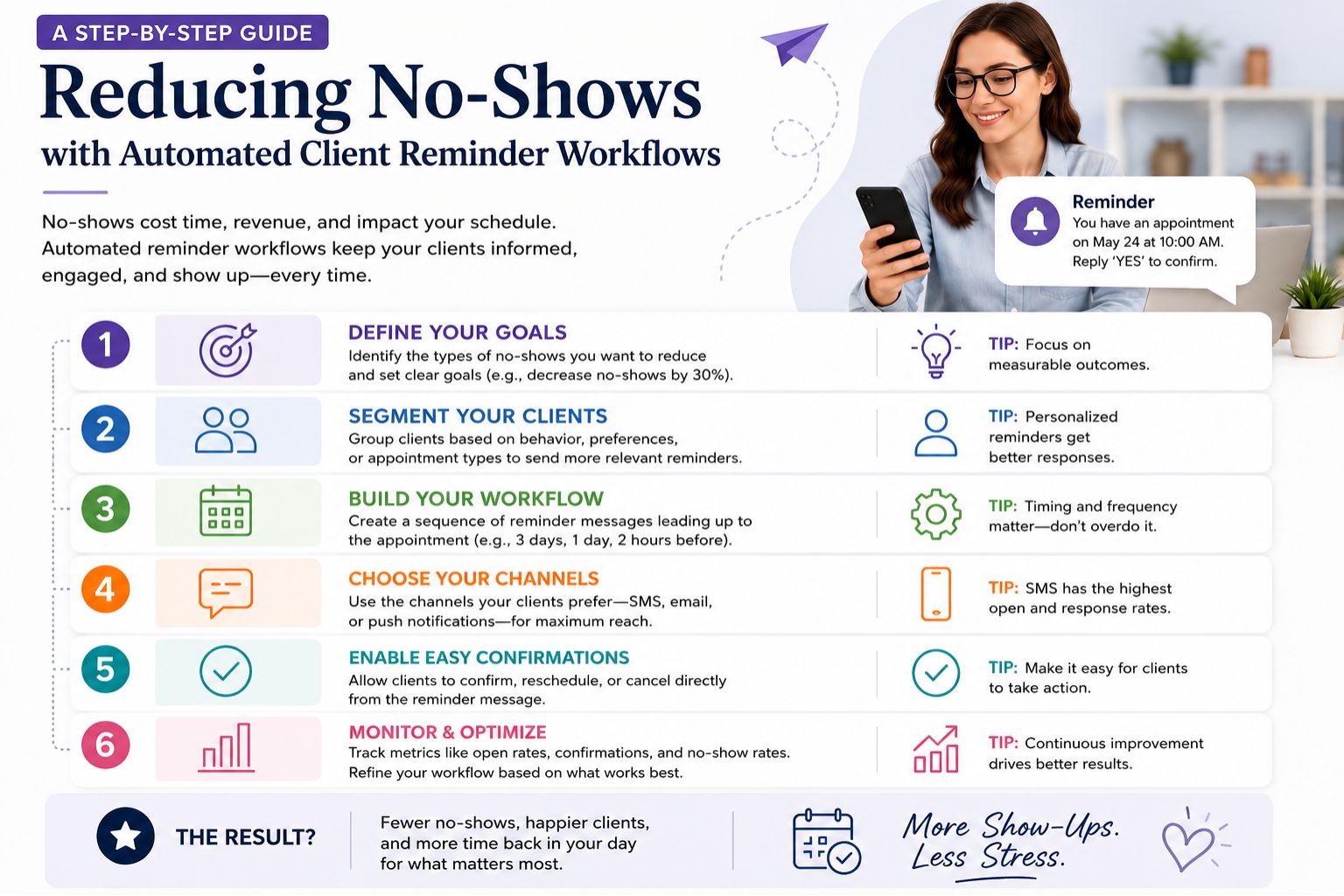


No-shows cost Indian salons real revenue every day—when a client forgets their booking, the chair stays empty and the stylist loses time. Automated client reminder workflows solve this by sending timely notifications that nudge customers before their appointment, reducing forgetfulness and last-minute cancellations. This guide walks you through setting up a system that works for salons, whether you run a small parlour or a chain. Honestly, I’ve seen so many salons just accept this loss like it’s normal, but it doesn’t have to be.
What Automated Reminder Workflows Mean for Salon Operations
An automated workflow is a sequence of messages—think SMS, WhatsApp, or in-app alerts—that trigger at specific intervals before a booking. For example, a salon might send a confirmation prompt 48 hours ahead, a reminder 2 hours before, and a rebooking link if the client cancels. This removes manual follow-ups, which many salon staff skip during busy hours, leading to gaps in communication. But here’s the thing—if the workflow isn’t set right, it just becomes another notification they ignore, you know?
Why No-Shows Happen and How Reminders Tackle Root Causes
Clients often forget appointments because they rely on memory or paper diaries, not digital nudges. In Indian salons, where walk-ins dominate, a booked slot without a reminder feels invisible. Automated workflows solve this by meeting clients where they are—on their phone—whether through an app notification from Parlourtime or a simple SMS. The result is a drop in no-shows from 20% to under 5% in tested salon cohorts. But I wonder, does this actually work for everyone, or just the ones who already check their phones all the time?
Common Mistakes Salons Make When Setting Up Reminder Systems
Many salons assume one reminder is enough, but timing matters. Sending an SMS too early, like seven days before, gets ignored, while too late, like 30 minutes ahead, gives no time to reschedule. Another oversight is failing to integrate reminders with the booking system—if a client changes their slot manually, the workflow doesn't update, triggering a wrong-time alert that frustrates customers. I’ve seen this happen, and honestly, it makes the salon look careless, not helpful.
How Clients Decide to Rebook After a Cancellation or Missed Slot
When a client cancels last-minute, the workflow should immediately offer a rebooking option with available slots, not just a confirmation notice. This turns a missed opportunity into a retained booking. Many users on Parlourtime use this feature to schedule a new time before they forget again, reducing salon downtime and keeping the calendar full even on slow days. But sometimes I feel like clients might get annoyed if they get too many messages—like, “just let me miss it in peace,” you know?
FAQ
q: How do automated reminders work for bridal or special event bookings?
a: For bridal packages, reminders start a week ahead with prep instructions, then shift to daily updates closer to the date, ensuring no one misses the trial run. But honestly, brides are already stressed, so you have to be careful not to overwhelm them.
q: Can reminders cause clients to cancel more often by reminding them?
a: Early reminders give clients a chance to reschedule instead of no-showing, which actually reduces overall cancellations because the slot gets filled again. That makes sense, but some clients might just cancel out of habit if they’re reminded too much.
q: What happens if a client has skin sensitivity or last-minute hair issues before an appointment?
a: Include a “contact us” link in the reminder so clients can inform the salon about concerns like irritation, allowing the stylist to adjust the service or suggest alternatives. I think that’s smart—better than showing up and having to cancel on the spot.
a: A well-timed workflow also sends a post-service follow-up asking for feedback, which builds trust and encourages repeat visits without extra effort from staff. But honestly, do people even reply to those? I usually just delete them.