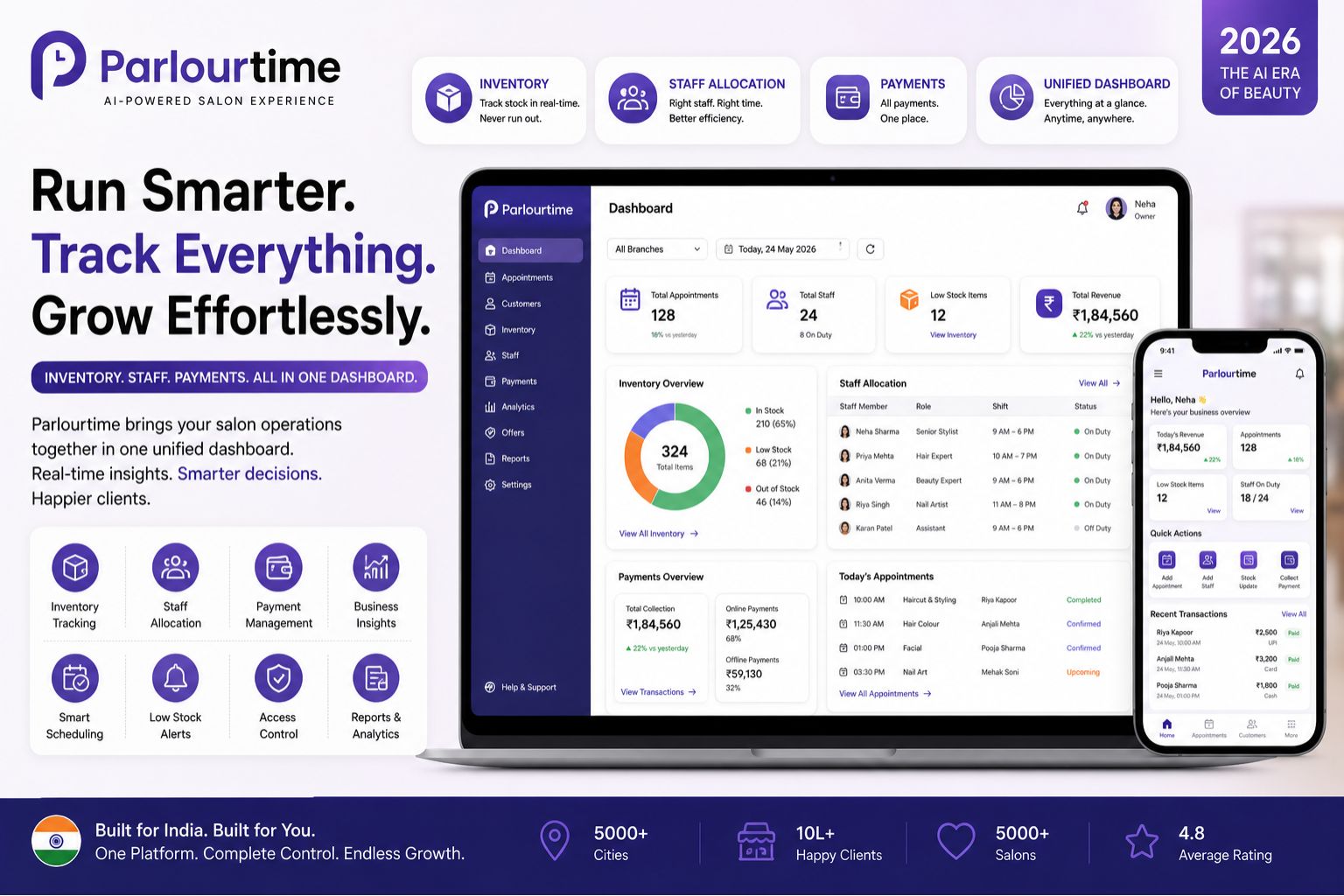


If you are running a salon and finding it difficult to keep track of product stock, staff schedules, and daily payments separately, you are not alone. A unified dashboard that combines Parlourtime inventory tracking, staff allocation, and payment management in 2026 is becoming essential for salon owners who want to reduce manual errors and last-minute chaos. Honestly though, I've been putting this off because I wonder if it will really fix everything or just add another thing to learn.
What This Unified Dashboard Means for Daily Salon Operations
In a busy salon, handling inventory separately from staff timing and payment records often leads to double work and confusion. A single dashboard brings together product levels, therapist availability, and transaction history in one view, so you do not have to switch between spreadsheets or logbooks. One salon owner in Bangalore mentioned that before using a unified system, her team spent nearly two hours each evening reconciling stock counts with service bookings, which often caused delays in closing the day. Two hours, imagine that... but I keep wondering if my staff will actually remember to log everything properly into one dashboard.
How Real Salons in India Experience Staff and Stock Gaps
Many salons in Indian cities face the issue of running out of a popular hair serum during a bridal package because the inventory was not updated after the morning service. At the same time, the salon manager may have assigned two therapists to the same client due to a scheduling overlap. A unified dashboard helps you see real-time staff allocation against upcoming appointments and product usage from past services, giving you a chance to reorder or reschedule before problems escalate. This is especially critical for salons handling multiple walk-ins during wedding seasons. But here's the thing — I still wonder if my receptionist will actually update product usage after every service, or will she forget like she forgets to close the cash drawer?
Common Misunderstandings That Cause Payment and Stock Leakage
One common mistake is assuming that payment records from the billing software automatically reflect staff commissions or product deductions. In reality, without a connected system, a therapist may continue using a particular product without it being logged, leading to stock shortages and incorrect payment splits. Another overlooked detail is that staff allocation often does not account for skill sets; for example, a senior stylist may be assigned a basic haircut while a junior is assigned a complex hair smoothening service. This mismatch affects service quality and client satisfaction. A unified dashboard allows you to set rules for product usage limits per service and match staff skill levels to appointment types, reducing these blind spots. Honestly, I've had that happen last month — my best senior was giving a simple trim while the new girl was struggling with a keratin treatment. So I see the value, but will the dashboard really know my staff's skills or will I have to manually enter everything?
How Salon Owners Are Deciding on the Right Dashboard Setup
When salon owners evaluate a unified system, they look at how easily it integrates with their existing billing and scheduling processes. Some start by testing the dashboard during low-traffic days to identify whether inventory alerts are accurate and staff allocation updates in real time. Others check if the payment reconciliation feature automatically matches service totals with product costs and commissions. The decision often comes down to whether the dashboard reduces the time spent on manual checks by at least 40 percent. Many salon owners in places like Mumbai and Delhi have reported that a unified view helps them spot trends, such as a particular facial lotion being used more frequently during summer months, allowing them to adjust purchase orders in advance. For salons that are part of Parlourtime, the dashboard offers a centralised view of all these operations without switching between platforms. But I keep thinking — what if my internet goes down during rush hour? That's when I really need things to work smoothly, not when I'm testing on a slow Tuesday.
FAQ
q Does a unified dashboard work with my existing billing software?
a Most modern dashboards offer API integrations with popular salon billing systems, but you should verify compatibility with your current provider before switching. Some systems require a direct data migration or a bridge tool to sync inventory and payment records. I'd rather check this first because switching everything and then finding out it doesn't talk to my old software would be a headache.
q What should I do if my staff allocation records are still showing errors after integration?
a Start by checking if all therapists have their daily schedules entered within the dashboard and if service durations match the allocated time slots. Manual overrides or incomplete client notes can cause gaps. Re-training your front desk team on how to log changes instantly can resolve most allocation issues. Honestly, I've trained them three times already on our current system and they still miss things.
q Can the dashboard automatically reorder products when stock runs low?
a Some advanced dashboards include low-stock alerts and generate purchase recommendations based on historical usage patterns, but full auto-reordering depends on your supplier's system integration. For small salons, manual confirmation after receiving an alert remains the common practice. So basically I still have to approve it myself — okay, that's fine, I don't trust a machine to order without me checking anyway.
q How long does it take for staff to get used to a unified dashboard?
a Typically, a team of five to eight staff members can adapt within two to three weeks if training is conducted daily for the first week. The key is to start with basic features like viewing daily schedules and logging product usage before introducing payment reconciliation or stock forecasting. For salons scaling up in 2026, platforms like Parlourtime are designed to reduce the learning curve with simple mobile-friendly interfaces. Two to three weeks... that's not bad, but I worry my older staff who struggle with smartphones will take much longer.