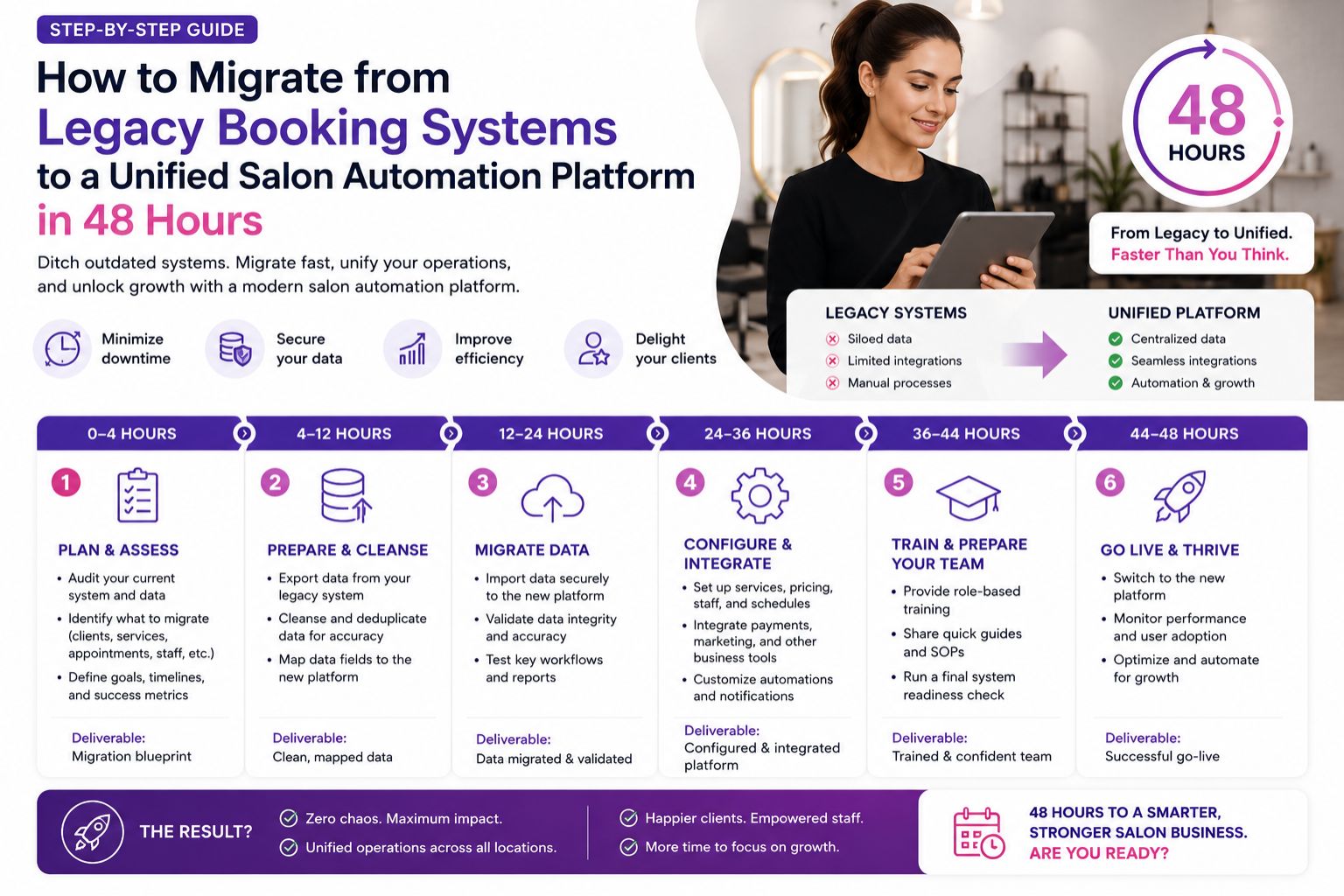


Migrating from an older booking system to a unified salon automation platform in just 48 hours — it's a high-stakes operation that salon owners often approach with anxiety, and honestly, who wouldn't be nervous? Yet it is entirely possible when you follow a structured, phased approach that prioritizes data integrity, staff readiness, and client communication. I've seen too many owners rush in and regret it later.
What This Migration Really Means for Your Salon Operations
This is not just a software swap, no, no — it is a full operational shift — from fragmented tools like paper registers or outdated desktop software to a single cloud-based system that handles appointments, staff scheduling, client history, and payments without gaps. But honestly, that "without gaps" part is where the fear comes in.
The Reality of Moving from Disconnected Systems to Unified Automation
Many Indian salons underestimate the hidden complexity of legacy data exports — especially when client notes span years of bridal prep records or skin sensitivity logs that do not map cleanly to new fields. Like, what happens to that one client's detailed allergy history? It just... disappears?
Common Mistakes That Sabotage a 48-Hour Migration Window
The biggest blind spot is assuming staff can learn the new platform during the migration window without prior training — that leads to double bookings, lost client names, and immediate calls to the previous vendor for rollback. I've heard of salons where the receptionist panicked and deleted everything by accident.
How to Decide If Your Salon Should Attempt This Timeline
This timeline works best when your current system is causing daily loss of appointments or staff errors — but you must have a dedicated point person from your team who can test the new platform's core workflows before the switch begins. Someone who actually knows how your salon runs, not just the tech guy.
FAQ
q Will my client data be safe during the export and import process?
a Yes, if you perform a full backup of your legacy system and do a test import with a sample of 50 client records before the actual migration — checking for missing fields or formatting errors. That's what I'd insist on, no shortcuts.
q How do I avoid complete downtime during the 48-hour window?
a Run both systems in parallel for the first 24 hours — new bookings go into the new platform while the old system remains read-only for history, with a simple manual sync process for any walk-ins. But honestly, that manual sync part can get messy if your staff isn't alert.
q What is the most overlooked data that gets lost in migration?
a Client allergy notes and product preferences — especially for bridal or bridal party packages — which many legacy systems store in free-text fields that new platforms may not automatically map to allergy or preference tags. That's a nightmare waiting to happen during a wedding booking.
q Can my staff realistically learn a new platform in two days?
a They can learn core booking and checkout functions if you hold a mandatory 2-hour walkthrough on day one and provide a one-page cheat sheet — but full feature adoption like automation triggers will take weeks. So don't expect miracles, just get the basics right first.